Item Types
Everything you can add to a page — apps, text, tasks, links, images, and more.
Overview
Everything in Tree Launcher is an item that lives inside a page. Items come in many types — from app shortcuts to text blocks to tasks. You can mix and match item types freely on any page.
Adding Items
- Enter Edit Mode
- Tap the + button in the toolbar
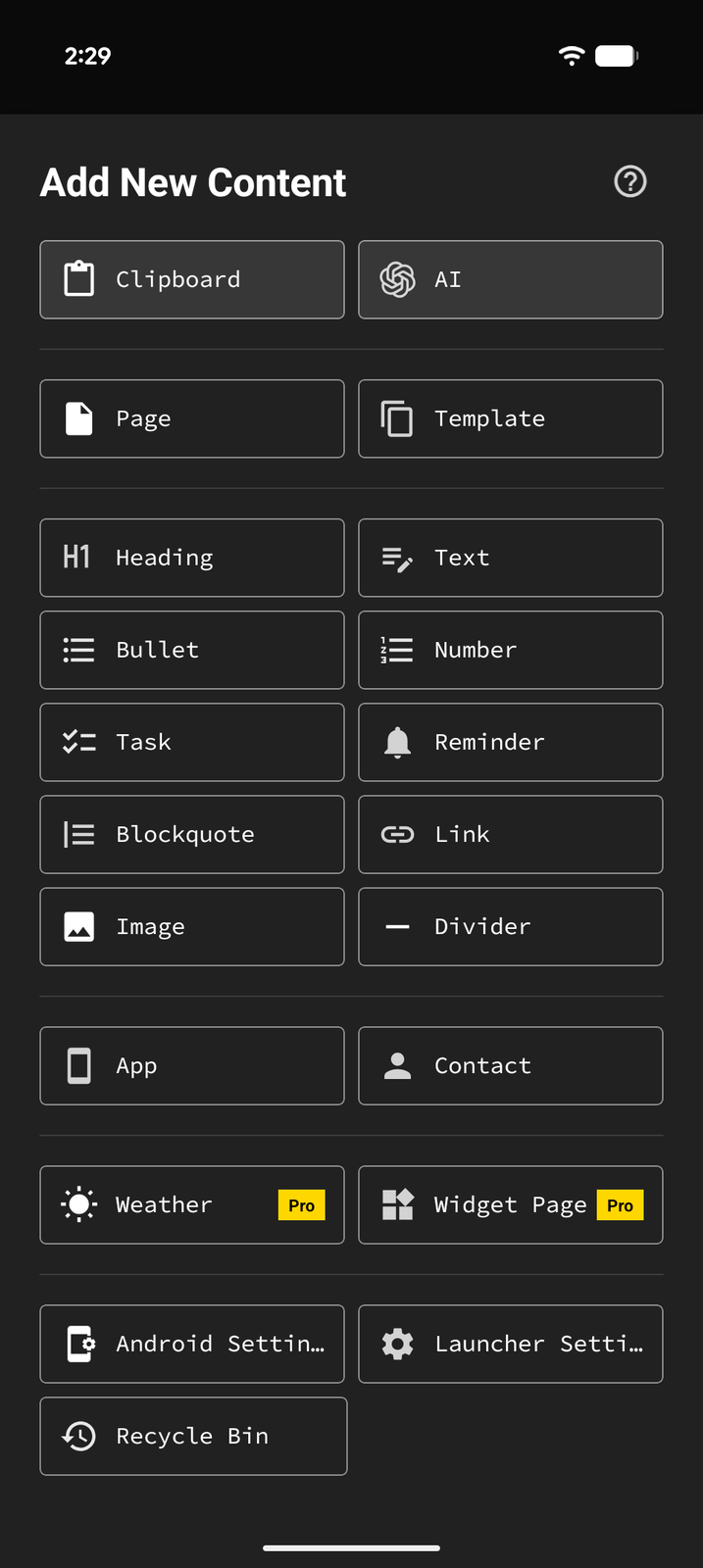
- Choose an item type from the menu
The add sheet also includes a Create from section for generating content instead of adding a single item — from your Clipboard, a saved Template, or with AI (Pro).
Content Items
Text
Freeform text blocks. Choose from multiple formats: - Text — Simple text content - Bullet — Bulleted list items - Number — Numbered list items - Blockquote — Quoted/highlighted text
See Text Content for details.
Heading
Section headers to structure your page. Available in three sizes: H1, H2, and H3.
Task
Text blocks with a completion checkbox. Tasks can optionally auto-delete when completed. See Tasks & Reminders.
Reminder
A quick-create task that opens the date picker immediately and sets a reminder. Perfect for quick capture of time-based to-dos. Auto-delete stays off unless you turn it on for the item.
Link
Save and open URLs. Tap a link to open it in your browser.
Image
Embed and view images inline on your page.
Divider
A visual separator line between sections of content.
Page
A child page — creates a nested container you can navigate into. See Pages.
Feeds
A feed page for reading headlines without leaving your launcher. Choosing Feeds offers three options: Google News (free), Custom Feed / Search to add your own RSS feeds (Pro), and Import OPML to bring in a subscription list (Pro). See RSS Feeds.
Launcher Items
App
A shortcut to launch any installed app on your device. See Apps & Contacts.
Contact
A shortcut to quickly call or message a contact. See Apps & Contacts.
System
A shortcut to a Tree Launcher screen (like App Settings or the Recycle Bin), one of your default apps, or a specific Android system settings screen (e.g., Wi-Fi, Bluetooth, Display). See Settings Shortcuts.
App Shortcut
A shortcut to a specific action inside an app (like composing a new message). These aren't in the add sheet — swipe an app item from right to left to open its shortcuts sheet and pin one to the page. See Apps & Contacts.
Pro Item Types
These items require a Pro subscription:
Widget
A dedicated page for embedding Android app widgets. Instead of a list of items, it holds a single scrolling column of widgets you can reorder and resize. See Widget Pages.
Weather
Displays weather forecasts and current conditions. See Weather.
Custom RSS feeds and OPML import are also Pro — see Feeds above.
Item Properties
Most items share some common properties, set from the item's Properties editor and its Options sheet in Edit Mode:
- Color — Set a custom background color (not available for items that open elsewhere, like links)
- Icon — Override the item's icon
- Pin — Pin the item for quick access via the pinned view
- Tags — Add tags for filtering and organization (see Search & Tags)
- Hide — Hide the item from the page without deleting it, via Hide under More (...) in the edit bar while the item is focused, or by swiping the item left to right in Edit Mode
Some items have additional properties like dates, reminders, and recurrence — see the relevant help pages for details.